

Baseline Acquisition Completed
Overview
Section titled “Overview”The Baseline Acquisition Completed trigger starts an automation when a baseline acquisition finishes successfully on an asset.
Use it to follow up on a new baseline, for example to notify the team or to compare it against the next acquisition.
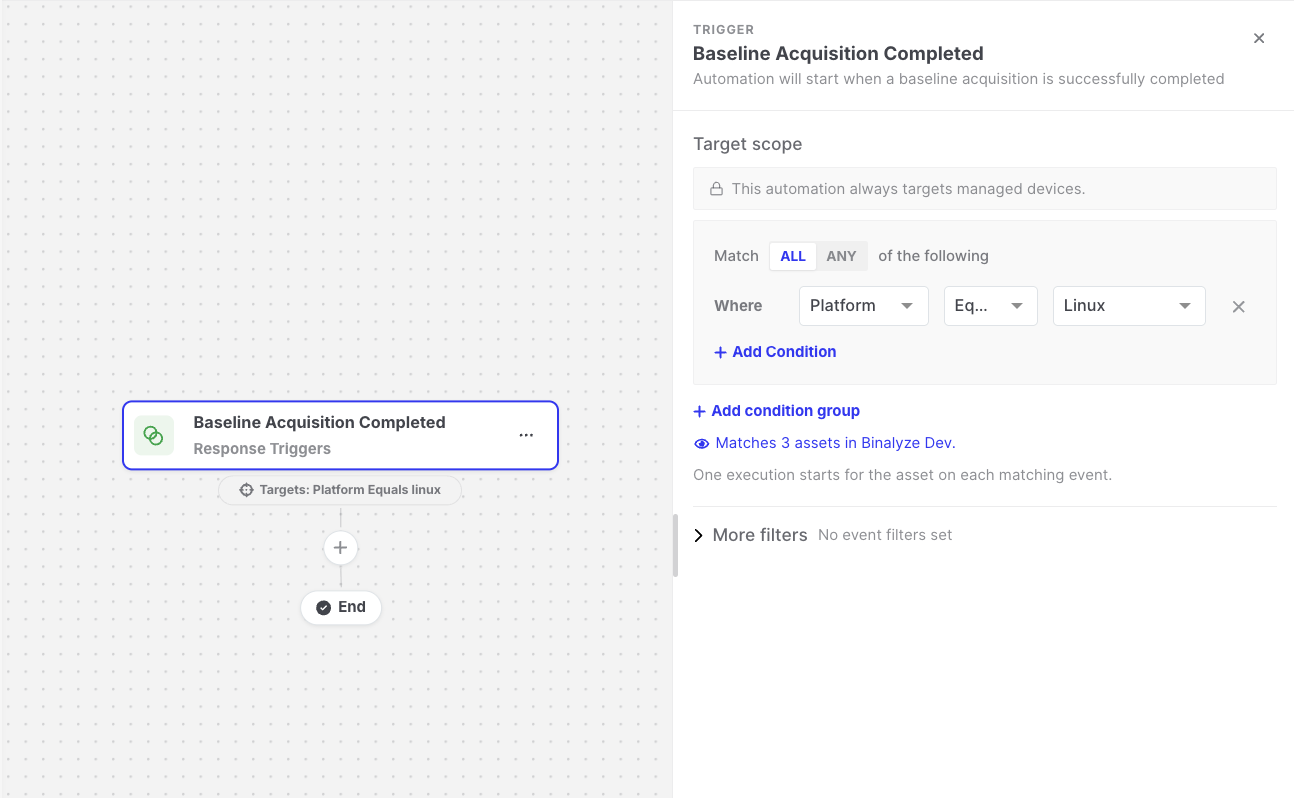
Baseline Acquisition Completed: Trigger settings
Settings
Section titled “Settings”| Setting | Description |
|---|---|
| Target scope | The assets the automation runs for. The asset on which the baseline finished must match. See Asset targeting. |
| More filters > Acquisition Profiles | Optional. Runs only for baselines that used one of the selected profiles. |
| More filters > Cases | Optional. Runs only for baselines in one of the selected cases. |
Data available to later steps
Section titled “Data available to later steps”| Field | Example expression |
|---|---|
| Asset name, platform, OS, IP address, and group | {{baseline-acquisition-completed.endpoint.endpointName}} |
| Number of findings | {{baseline-acquisition-completed.findingCounts.allFindings}} |
| Duration in seconds | {{baseline-acquisition-completed.timeTookInSeconds}} |
- Baselines created by an automation’s Start Baseline Acquisition action only start this trigger if Trigger Other Automations is enabled on that action.