

Quickstarts
Overview
Section titled “Overview”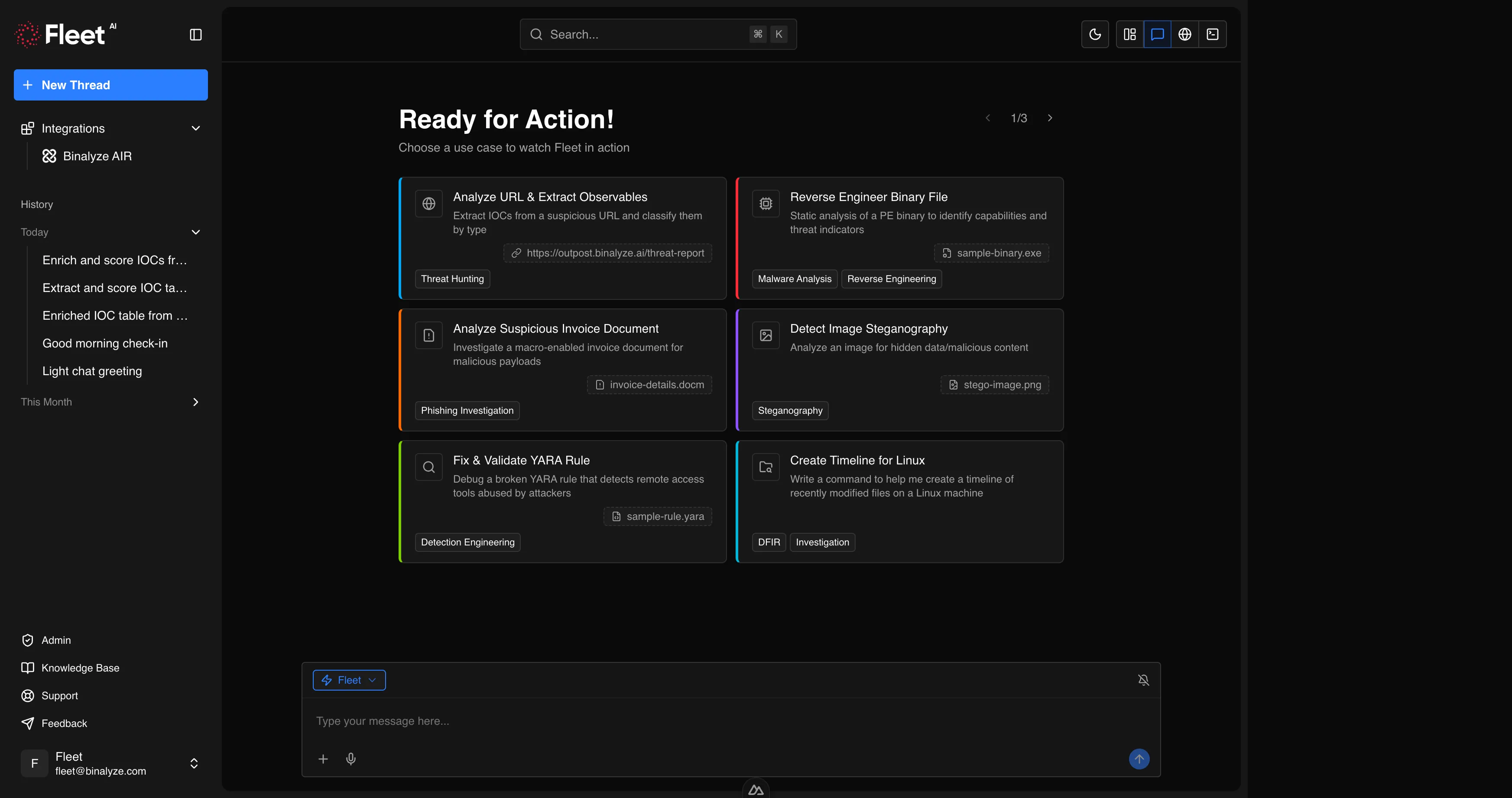
Quickstarts are pre-configured prompt cards displayed on the new chat screen when you open Fleet. Each quickstart provides a ready-to-use prompt that demonstrates a specific Fleet capability. Many quickstarts also include a sample file so you can see Fleet in action immediately without needing to provide your own evidence.
Quickstarts serve two purposes:
- Discovery — new users can explore Fleet’s capabilities by clicking any quickstart card and observing the full analysis workflow.
- Efficiency — experienced users get one-click access to common workflows. Select a quickstart, optionally replace the sample file with your own, and Fleet executes the full analysis.
To use a quickstart, click its card on the new chat screen. The prompt is pre-filled and any sample file is automatically attached. You can modify the prompt or replace the attachment before sending.
Threat Hunting
Section titled “Threat Hunting”Analyze URL and Extract Observables
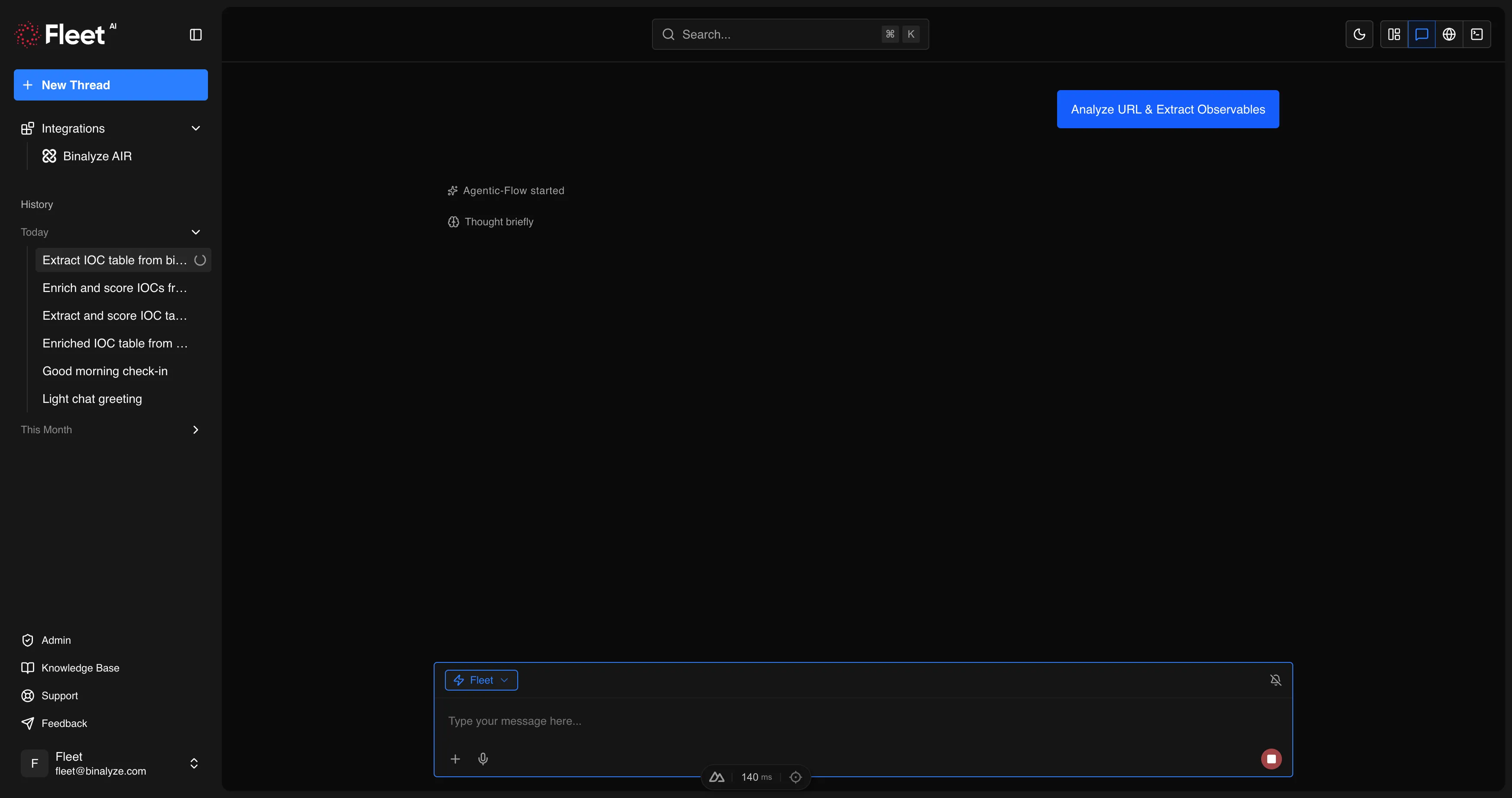
Section titled “Analyze URL and Extract Observables”Extract IOCs from a suspicious URL and classify them by type. Fleet fetches the page content, extracts all observables, enriches them with reputation data and risk scores, and delivers an organized IOC table filtered for relevance.
Includes sample: a URL to a threat report page.
Fleet delivers: enriched and scored IOC table organized by type.
Hunt APT29 Indicators from Threat Report
Section titled “Hunt APT29 Indicators from Threat Report”Build a full threat intelligence pipeline from a threat report. Fleet extracts and enriches all observables, converts to STIX 2.1, searches for the latest advisories, and produces detection rules and an executive threat briefing.
Includes sample: APT29 threat report archive.
Fleet delivers: enriched IOC table, ATT&CK technique mapping, detection rules (Sigma, YARA, osquery), and executive threat briefing.
Malware Analysis
Section titled “Malware Analysis”Reverse Engineer Binary File
Section titled “Reverse Engineer Binary File”Static analysis of a PE binary to identify capabilities and threat indicators.
Includes sample: a PE executable (sample-binary.exe).
Fleet delivers: capability summary, IOC table (hashes and network indicators), risk level with reasoning, and MITRE ATT&CK mapping.
Unpack and Compare Packed vs. Unpacked Malware
Section titled “Unpack and Compare Packed vs. Unpacked Malware”Side-by-side analysis of packed and unpacked LokiBot variants to reveal hidden capabilities.
Includes sample: archive containing packed and unpacked LokiBot variants.
Fleet delivers: side-by-side comparison table (imports, strings, entropy, API calls, size, timestamps), capability assessment, ATT&CK mapping, and a YARA rule detecting both forms.
Analyze Dumped and Repaired Binary
Section titled “Analyze Dumped and Repaired Binary”Reverse engineer a memory-dumped svchost.exe with reconstructed IAT to uncover injected malware capabilities.
Includes sample: suspicious svchost.exe archive dumped from memory.
Fleet delivers: evidence of the injection technique, capability assessment, IOC table, ATT&CK mapping, and forensic report.
Deobfuscate .NET Malware
Section titled “Deobfuscate .NET Malware”Strip SmartAssembly obfuscation from a .NET binary to reveal true functionality.
Includes sample: obfuscated .NET assembly archive.
Fleet delivers: identified obfuscation techniques, deobfuscation script, capability assessment, extracted IOCs, and YARA rule for both variants.
Profile Credential Stealer Capabilities
Section titled “Profile Credential Stealer Capabilities”Deep-dive analysis of KPOT 2.0 stealer to map targeted applications and credential stores.
Includes sample: KPOT 2.0 stealer archive (password-protected).
Fleet delivers: target matrix (application, category, targeted paths, data stolen), C2 protocol analysis, detection rules, and threat advisory.
Ransomware Triage and Decryption Assessment
Section titled “Ransomware Triage and Decryption Assessment”Analyze ransomware cryptographic implementation to assess data recovery feasibility.
Includes sample: CryptoCrazy ransomware archive (password-protected).
Fleet delivers: crypto scheme analysis, decryption feasibility rating, detection rules, and IR decision matrix.
Reverse Engineering
Section titled “Reverse Engineering”Decode Obfuscated Shellcode
Section titled “Decode Obfuscated Shellcode”Reverse engineer encoded shellcode by decoding, disassembling, and extracting IOCs.
Includes sample: encoded shellcode archive.
Fleet delivers: decryption script, disassembly highlights, extracted IOCs, ATT&CK mapping, and YARA rule for both encoded and decoded forms.
Phishing Investigation
Section titled “Phishing Investigation”Analyze Suspicious Invoice Document
Section titled “Analyze Suspicious Invoice Document”Investigate a macro-enabled invoice document for malicious payloads.
Includes sample: macro-enabled Word document (invoice-details.docm).
Fleet delivers: deobfuscated macro code, full execution chain, extracted IOCs, ATT&CK mapping, and verdict with confidence level.
Investigate Office Template Injection
Section titled “Investigate Office Template Injection”Analyze a Word document using external template references to bypass macro detection.
Includes sample: Word document archive using template injection.
Fleet delivers: extracted external URLs, bypass technique explanation, detection rules (YARA, Sigma, osquery), and comparison table of template injection vs. traditional macro attacks.
Steganography
Section titled “Steganography”Detect Image Steganography
Section titled “Detect Image Steganography”Analyze an image for hidden data or malicious content.
Includes sample: a PNG image (stego-image.png).
Fleet delivers: detection results per method (LSB, EOF, tool signatures, entropy), any extracted hidden content, and confidence assessment.
Detection Engineering
Section titled “Detection Engineering”Fix and Validate YARA Rule
Section titled “Fix and Validate YARA Rule”Debug a broken YARA rule that detects remote access tools abused by attackers.
Includes sample: a YARA rule file with syntax errors (sample-rule.yara).
Fleet delivers: explanation of the error, corrected rule, scan results with matches, and improvement suggestions.
Build Sigma Rules from Attack Scenario
Section titled “Build Sigma Rules from Attack Scenario”Generate, validate, and convert Sigma detection rules for a multi-stage attack chain.
Includes sample: Windows event log archive (JSONL format with Security, Sysmon, and PowerShell events).
Fleet delivers: validated Sigma rule per attack stage, converted to Splunk SPL and Sentinel KQL, correlation meta-rule, test results, and per-rule documentation.
DFIR and Investigation
Section titled “DFIR and Investigation”Create Timeline for Linux
Section titled “Create Timeline for Linux”Generate a command to create a forensic timeline of recently modified files on a Linux machine.
No sample file included.
Fleet delivers: a ready-to-paste bash command targeting IR-relevant directories, with explanation and red flags to watch for.
Analyze Windows Event Log
Section titled “Analyze Windows Event Log”Investigate a Windows EVTX event log for suspicious activity and security events.
Includes sample: a Windows Event Log file (sample-eventlog.evtx).
Fleet delivers: timeline of significant security events, suspicious patterns, extracted IOCs, and risk assessment with recommended response actions.
Investigate PowerShell Exfiltration Script
Section titled “Investigate PowerShell Exfiltration Script”Trace a HiveNightmare exploit chain from PowerShell exfiltration script to Python C2 server.
Includes sample: archive containing a PowerShell script and Python C2 server.
Fleet delivers: deobfuscated code, exploit chain explanation, exfiltration protocol analysis, ATT&CK mapping, detection rules, and IR playbook.
Network Forensics
Section titled “Network Forensics”Crack and Analyze Encrypted PCAP
Section titled “Crack and Analyze Encrypted PCAP”Crack an encrypted ZIP archive and analyze the network capture inside.
Includes sample: password-protected ZIP archive containing a PCAP file.
Fleet delivers: cracked password, protocol statistics, IOC table, suspicious findings, and threat assessment.