

SOC Analyst
Role Overview
Section titled “Role Overview”SOC analysts are the first line of defense. They triage alerts, investigate indicators, escalate incidents, and document findings under constant time pressure. Fleet accelerates every stage of this workflow by handling the repetitive, tool-intensive work while the analyst stays in control of decisions.
Workflow: Phishing Email Triage
Section titled “Workflow: Phishing Email Triage”A phishing alert arrives from the email gateway. The analyst needs to determine whether the email is malicious, extract indicators, and decide whether to escalate.
Step 1: Extract and Enrich Observables
Section titled “Step 1: Extract and Enrich Observables”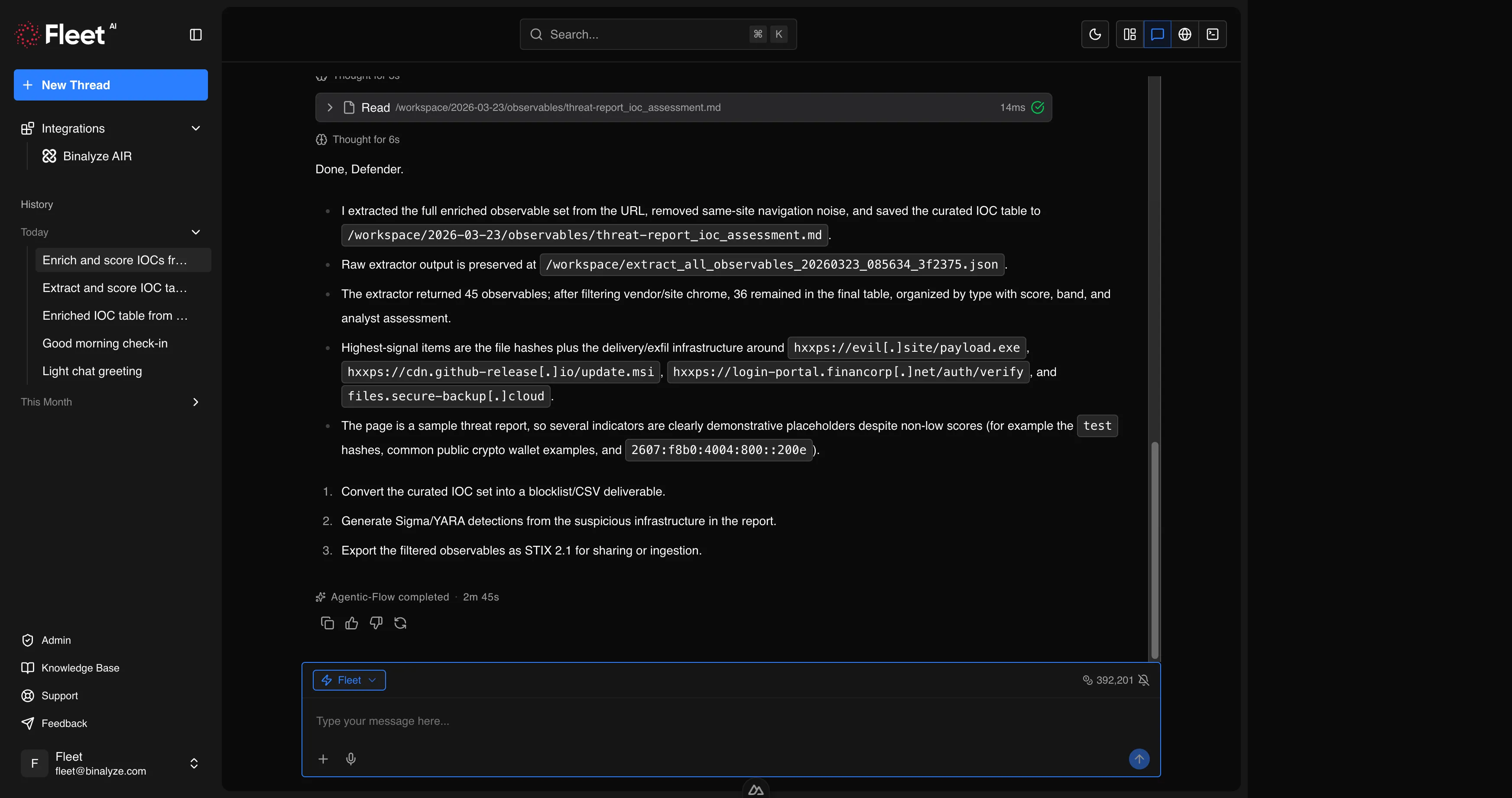
Open Fleet and paste the suspicious URL or upload the email attachment. Ask Fleet to extract and enrich all observables.
Extract and assess all observables from this URL: https://example.com/suspicious-pageFleet fetches the page content, extracts all indicators (IPs, domains, URLs, hashes, email addresses), checks each against reputation databases, scores risk with confidence levels, and filters out known-good domains using popularity data.
Result: A scored IOC table organized by type, with high-risk indicators flagged.
Step 2: Analyze the Attachment
Section titled “Step 2: Analyze the Attachment”If the email contains a document attachment, upload it directly.
Analyze this macro-enabled Word document for malicious content.Fleet extracts and deobfuscates VBA macros, identifies auto-execution triggers, detects embedded objects and external template references, and traces the full execution chain.
Result: Deobfuscated macro code, execution chain, extracted IOCs, MITRE ATT&CK mapping, and a verdict with confidence level.
Step 3: Generate Detection Rules
Section titled “Step 3: Generate Detection Rules”Based on the findings, ask Fleet to create detection rules to catch similar attacks across the organization.
Generate a Sigma rule to detect the PowerShell download cradle found in this macro, and a YARA rule for the document itself.Fleet generates both rules, validates them (Sigma against the specification, YARA compilation), and converts the Sigma rule to Splunk SPL and Microsoft Sentinel KQL.
Result: Validated detection rules ready for deployment.
Step 4: Deploy via AIR
Section titled “Step 4: Deploy via AIR”If connected to AIR, deploy the rules immediately.
Deploy this YARA rule to all Windows endpoints tagged "email-gateway-users".Fleet sends the triage task through AIR and monitors deployment progress.
Result: Detection rules active across targeted endpoints.
Step 5: Document and Escalate
Section titled “Step 5: Document and Escalate”Ask Fleet to produce a summary for the incident ticket.
Summarize the findings from this session as an incident report suitable for escalation.Result: A structured report with timeline, indicators, analysis results, detection rules deployed, and recommended next steps.
Workflow: Bulk IOC Assessment
Section titled “Workflow: Bulk IOC Assessment”The threat intelligence team shares a list of indicators from a new advisory. The analyst needs to assess which ones are relevant to the environment.
Step 1: Ingest and Enrich
Section titled “Step 1: Ingest and Enrich”Upload the advisory or paste the IOC list.
Extract all observables from this threat advisory PDF, enrich them, and produce a STIX 2.1 bundle.Fleet extracts every observable, enriches each with reputation data, filters out known-good software hashes (NSRL) and popular domains, scores risk, and produces output in multiple formats.
Result: Markdown report for human review, STIX 2.1 bundle for SIEM import, and optionally YARA rules generated from the enriched indicators.
Step 2: Cross-Reference with Endpoints
Section titled “Step 2: Cross-Reference with Endpoints”If connected to AIR, check whether any indicators are present in the environment.
Search for endpoints that have communicated with any of the high-risk domains from the previous analysis.Fleet queries AIR endpoints and correlates findings with the enriched IOC list.
Step 3: Generate and Deploy Rules
Section titled “Step 3: Generate and Deploy Rules”Generate Sigma rules for the top 5 highest-risk indicators and deploy them to all managed endpoints.Fleet creates, validates, converts, and deploys the rules in a single workflow.
Workflow: Suspicious Process Alert
Section titled “Workflow: Suspicious Process Alert”An EDR alert fires for an unusual process on a workstation. The analyst needs to determine whether it is malicious.
Step 1: Acquire the Binary
Section titled “Step 1: Acquire the Binary”Download the file C:\Users\jdoe\AppData\Local\Temp\svchost.exe from WORKSTATION-042 for analysis.Fleet retrieves the file from the endpoint via AIR’s interACT feature.
Step 2: Analyze
Section titled “Step 2: Analyze”Perform full static analysis on this binary. Focus on persistence mechanisms, network indicators, and process injection techniques.Fleet runs PE analysis, string extraction, import analysis, entropy measurement, packer detection, capability identification, and MITRE ATT&CK mapping.
Result: Capability summary, IOC table, risk level, and technique mapping.
Step 3: Contain
Section titled “Step 3: Contain”If the binary is malicious, contain the endpoint immediately.
Isolate WORKSTATION-042 from the network.Fleet isolates the endpoint through AIR while maintaining management communication.
Step 4: Sweep the Organization
Section titled “Step 4: Sweep the Organization”Generate a YARA rule from the IOCs found in this binary and deploy it to all Windows endpoints.Fleet creates the rule from the analysis findings, validates it, and deploys it organization-wide through AIR triage.
Shift Handoff
Section titled “Shift Handoff”At the end of a shift, the analyst needs to hand off open investigations to the next team.
Fleet sessions contain the full conversation history, tool outputs, and generated files. The analyst can:
- Export session files from the workspace — all reports, detection rules, STIX bundles, and analysis outputs are available for download.
- Reference the session — share the session with the next analyst so they can review the full investigation context.
- Produce a handoff summary — ask Fleet to summarize all findings and open items from the session.
Summarize everything we have done in this session. List findings, actions taken, detection rules deployed, and any open items that need follow-up.Result: A structured handoff document ready for the next shift.