

Accessing Google Workspace
Two authentication methods are available for conducting cloud forensics with Binalyze Tornado for Google Workspace. Each provides different levels of access and data collection capabilities.
1. Normal User Login
Section titled “1. Normal User Login”What is it?
- Basic user authentication method
- Uses individual Google Workspace account credentials
- Ideal for single-user investigations
- Limited to personal data access
When to use it?
- Investigating a specific user’s activities
- Collecting personal mailbox data
- Analyzing individual Drive activities
- Reviewing personal email settings
2. Service Account Login
Section titled “2. Service Account Login”What is it?
- Advanced authentication method
- Uses service account credentials for organization-wide access
- Includes all normal user capabilities plus administrative features
When to use it?
- Organization-wide investigations
- Security incident response
- Compliance audits
- Multi-user data collection
Normal User Login Collectors
Section titled “Normal User Login Collectors”1. Mail Data Collectors
- Mail Collection
- What it collects: Emails (sent, received, and stored messages)
- Use case: Communication analysis
- Example: Investigating email threads and attachments
- Scope: Personal mailbox only
- Email History Information
- What it collects: Detailed history of email activities
- Use case: Timeline analysis
- Example: Tracking email sending patterns
- Scope: Personal email history
- Label Usage Information
- What it collects: Email organization patterns
- Use case: Information management analysis
- Example: Understanding how emails are categorized
- Scope: Personal label usage
- Email Settings Information
- What it collects: Account configurations
- Use case: Email setup analysis
- Example: Reviewing auto-forwarding rules
- Scope: Personal email settings
2. Drive Activities Collectors
- Drive Usage Activities
- What it collects: File activities and sharing information
- Use case: Document access analysis
- Example: Tracking personal file-sharing history
- Scope: Personal Drive activities
Service Account Login Collectors
Section titled “Service Account Login Collectors”When using the Service Account login method, you will need to provide Tornado with the Google Workspace (GWS) private key generated during the setup process (refer to the link above for detailed instructions). This key is typically provided in the form of a JSON file, as illustrated below.
Additionally, you must specify the email address of an impersonated user, which should belong to an administrator or a user with the required permissions, as outlined in the example below.
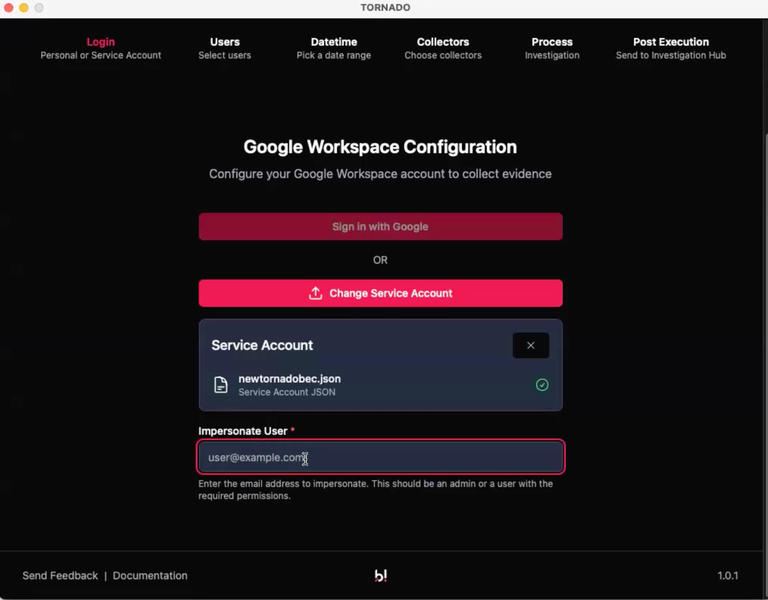
Accessing Google Workspace: GWS credentials for Service Account login
The Service Account will provide you with access to all accounts, but Tornado will enable you to filter down to only the accounts of interest.
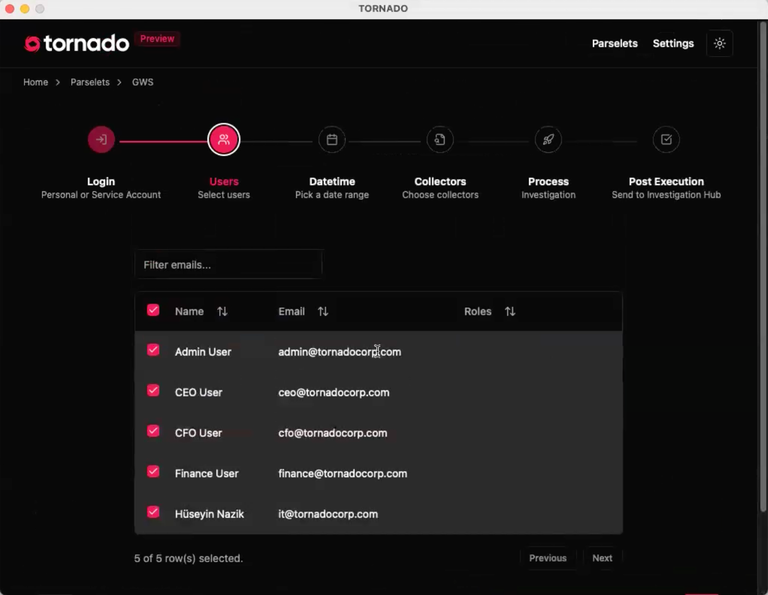
Accessing Google Workspace: Users
1. All Normal User Collectors (with Extended Scope)
- Access: Includes all collectors listed above
- Scope: Organization-wide data collection, applicable to any user
- Capabilities: Broader data visibility and collection
2. Reports Data Collectors (Service Account Only)
- Access Transparency Collector
- What it collects: System access logs
- Use case: Security monitoring
- Example: Tracking admin access to user data
- Key features:
- Google staff access logs
- System-level access tracking
- Compliance monitoring
- Admin Collector
- What it collects: Administrative activities
- Use case: Admin behavior analysis
- Example: Tracking configuration changes
- Key features:
- Admin action logs
- System settings changes
- User management activities
Key Differences Between Access Modes
Section titled “Key Differences Between Access Modes”| Access Scope | Personal data only | Organization-wide data |
|---|---|---|
| Data Collection | Limited to authenticated user | All users and administrative data |
| Best For | Individual investigations | Enterprise-level investigations |
| Advantages | Simple, user-specific analysis | Complete visibility of organization data |
| Limitations | Cannot access other users’ data | Requires service account credentials |
| Use Case Example | “I need to investigate my own email communications from last month.” | “I need to investigate all email communications within the finance department.” |